MERGE EXCEL FILES
Merge Excel files into one remove duplicates
Spreadsheets from several places? Merge them into one table.
Combine several Excel and CSV files into one table by matching header names. Columns line up even in a different order, and columns that differ only by name can be joined in the column matching table. Duplicate rows are removed on the same screen.
In short Excel merge desk is a web tool that combines multiple Excel and CSV files by column name, removes duplicate rows or splits the result, and saves it as XLSX or CSV. Up to 30 files (20MB each, 60MB in total); results up to 40,000 rows and 200 columns. Formulas are carried over as their saved values, and password-protected files can’t be opened.
BEFORE → AFTER
Three stores’ October order lists in one table
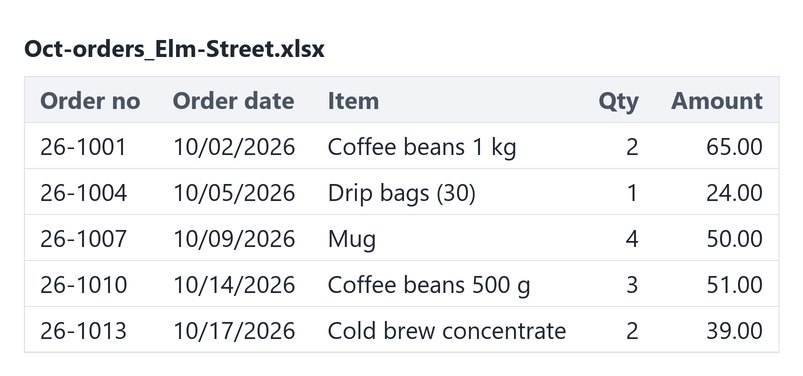
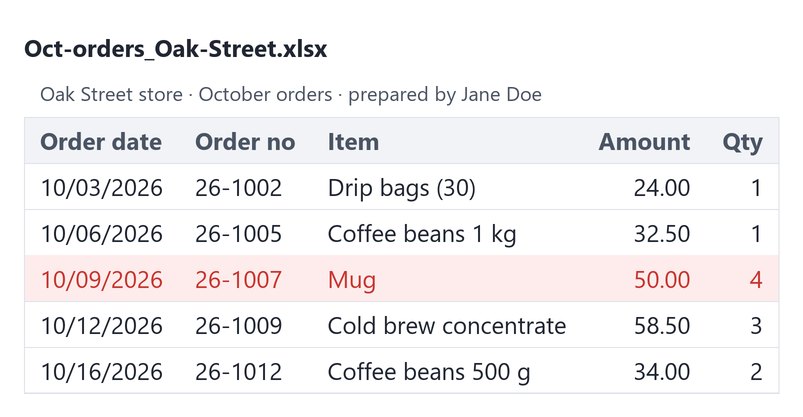
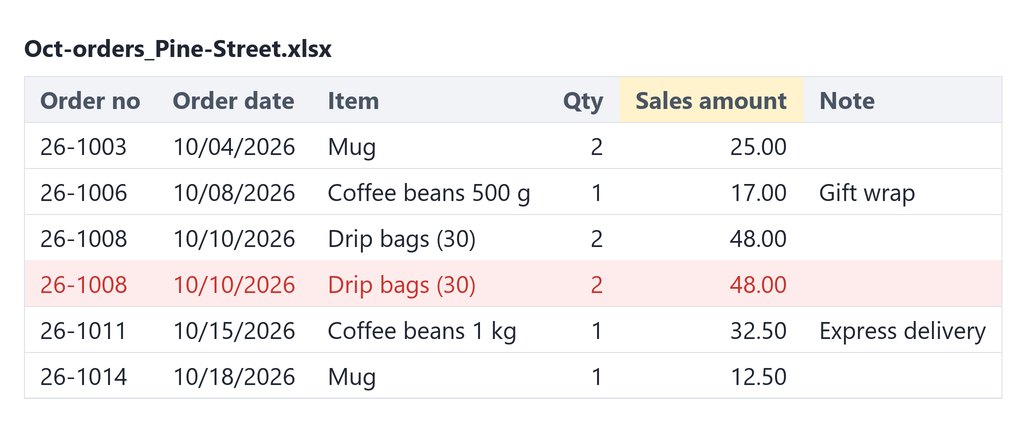
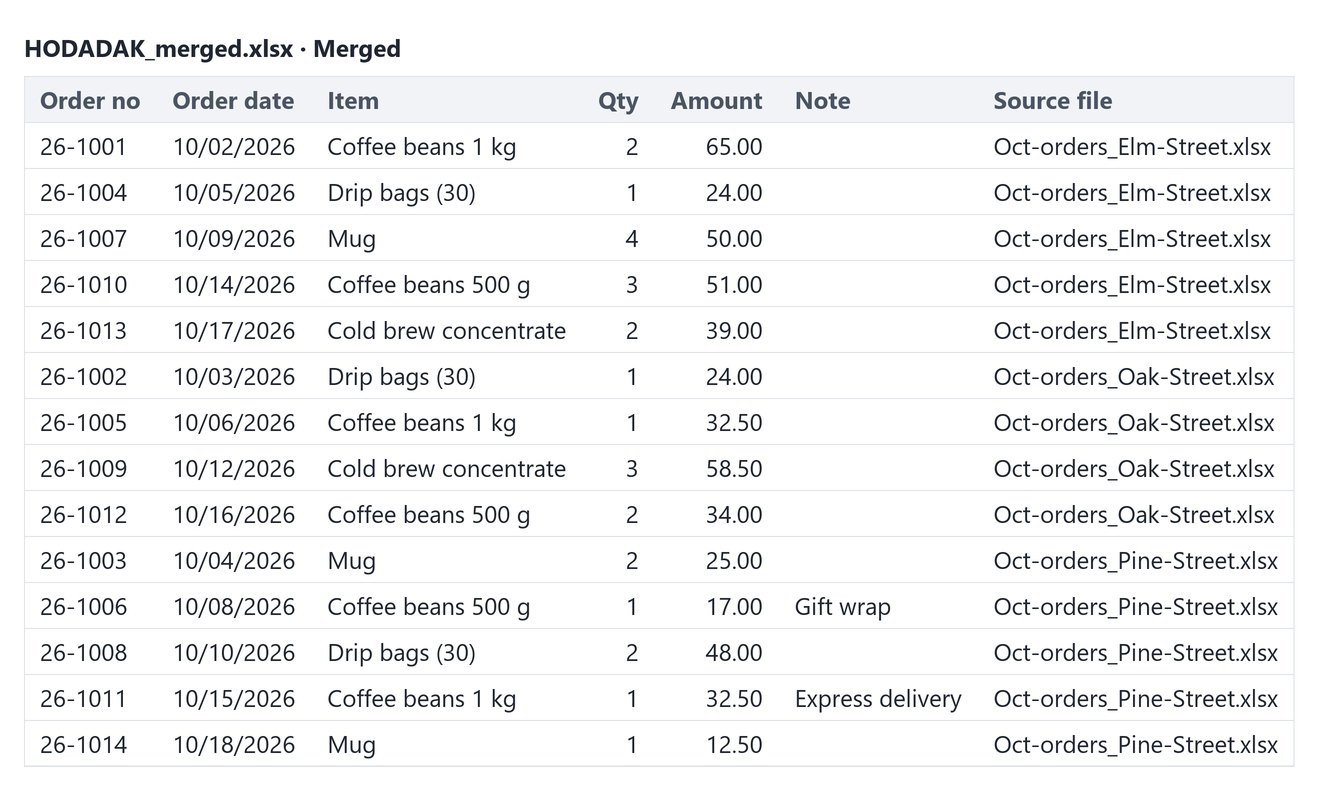
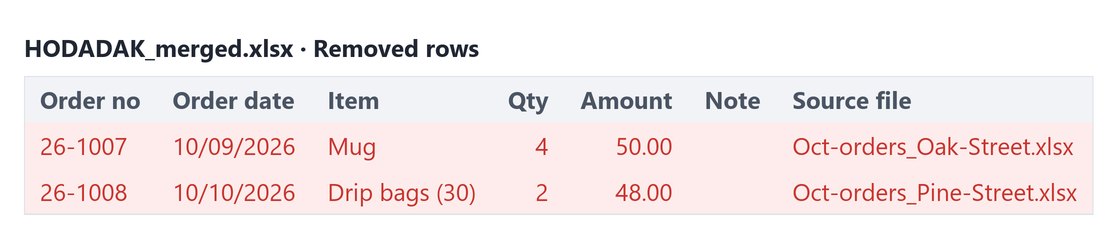
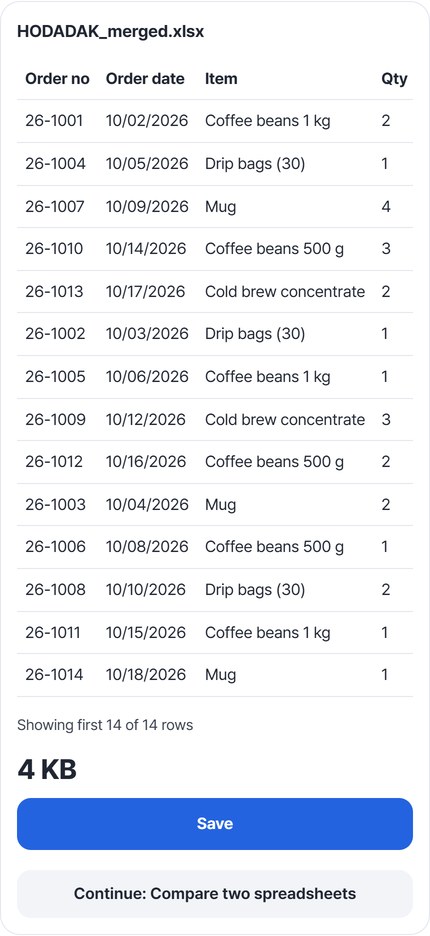
The three sample files (Oct-orders_Elm-Street, Oak-Street and Pine-Street.xlsx, 16 rows in all) have their columns in different orders. The Oak Street file has a “prepared by” line at the top, and the Pine Street file calls the amount column “Sales amount” and has an extra “Note” column. After merging Sales amount into Amount and removing duplicates by order number, order 26-1007 (listed by two stores) and 26-1008 (entered twice) dropped out, leaving 14 rows. Reopening the saved HODADAK_merged.xlsx (3,545 bytes) showed the same cell values and the same date and amount formats as the original files.
Actual result of merging three order lists with made-up store names in Excel merge desk v0.1.4. The tables are drawn from the cell values of the three original files and of the two sheets in the saved XLSX (Merged and Removed rows), reopened. Red rows were removed as duplicates; the yellow cell is the column with a different name. The colors are added only in this guide and are not in the saved file.
HOW TO
Three steps and done
Choose all files and check column matching
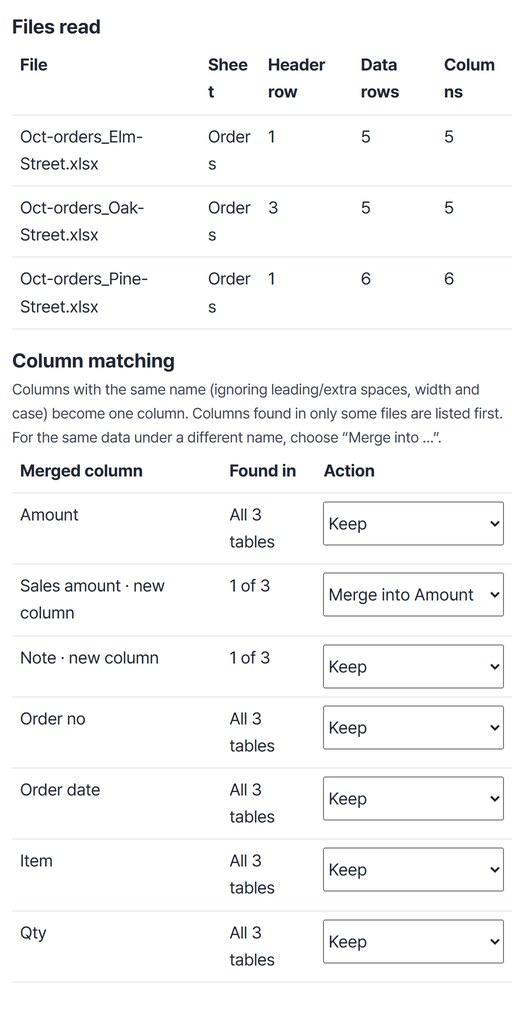
Choose all the files at once and “Files read” shows the header row and data rows for each file. Even with a “prepared by” line on top, the Oak Street header is found on row 3. In “Column matching,” the Sales amount column was set to “Merge into Amount.” To change the merge order, drag the file list or use “Move up” and “Move down.”
Turn on duplicate removal and pick the column
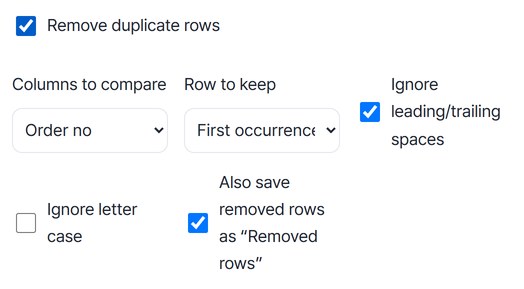
Turn on “Remove duplicate rows” and choose Order no under “Columns to compare.” The row to keep is “First occurrence.” With “Also save removed rows as ‘Removed rows’” on, the removed rows go to a second sheet in the same file.
Press Merge, check the preview and save
Press “Merge” to see the summary “3 files · 16 → 14 rows (2 duplicates) · 6 columns (1 new)” and a preview of up to 50 rows. Check it, then press “Save.” The last column, “Source file,” shows which file each row came from.
WHEN
Perfect for
- Collecting the same form from branches or stores
Columns are matched by header name even when their order differs a little.
- Stacking several months and cleaning up overlaps
Pick a key column to remove rows entered twice, and keep the removed rows separately.
- Splitting a merged table again, e.g. by team
Use “Split” by column value, by original file, or every N rows to save several files.
GOOD TO KNOW
Good to know
- Only values and number/date formats are copied. Colors, fonts, borders, images and comments are not. Formulas become their saved results and are not recalculated.
- A duplicate is a row with the same value in the chosen columns. With “When all columns match” as the key, rows that differ in any cell stay. The example above checked only the order number, so an order listed in two stores’ files was kept once.
- Rows are joined in file order. They are not re-sorted by date; sort the saved file in Excel if needed.
- Opening a CSV directly in Excel can drop leading zeros (00412) and change long numbers. Save as XLSX if you will use it in Excel. Password-protected files can’t be opened.
- Up to 30 Excel/CSV files, 20MB each and 60MB in total. Results up to 40,000 rows, 200 columns and 1.2 million cells.
FAQ
Frequently asked questions
Where do my files get uploaded?
Nowhere. Everything is processed in this device's browser, so there is nothing on a server to delete. Results you haven't saved are cleared when you close the window.
Are columns with different names merged automatically?
No. Only differences in leading or extra spaces, character width and letter case are ignored. Columns named differently, like “Amount” and “Sales amount,” become separate columns. Choose the column to merge into in the column matching table, as in “Merge into Amount.”
Which devices was it checked on?
We merged the files in Edge on Windows and reopened the saved file to check it. The pre-release audit also ran a simulated test in WebKit (the engine behind Safari). Real Mac, iPhone and Android devices haven’t been checked yet.
NEXT
Handy next steps
 CSV
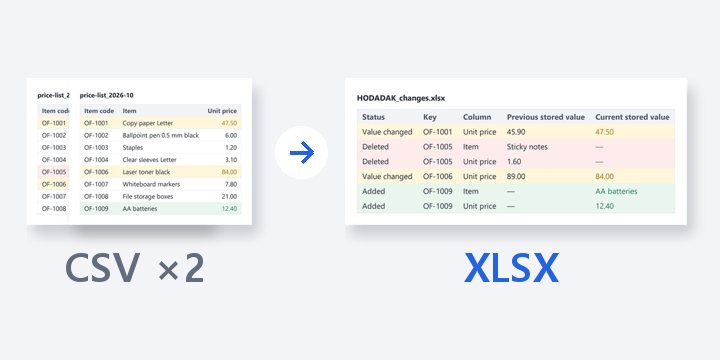
CSVMatch two versions by a key column, find added, deleted and changed rows, and get a report with cell locations.
Open