ANNUAL LEAVE
Korean annual leave calculator fiscal year too
Leave left when you quit, compared with the hire-date basis.
Enter your hire date, last working day and leave used, and the Korean annual leave you earned is listed by date. If your company uses a fiscal-year basis, it is compared side by side with the hire-date basis, with any shortfall and pay for unused days. A reference calculation under the Labor Standards Act.
In short Annual leave calculator is a web tool that compares Korean annual leave by hire date and by fiscal year from your start date, reference date and days used, and shows pay for unused leave. One person at a time; days used go in 0.25-day steps. A reference calculation under Articles 60–61 of the Labor Standards Act — it doesn’t judge attendance rates, expiry or the scope of ordinary wages, and company rules may differ.
BEFORE → AFTER
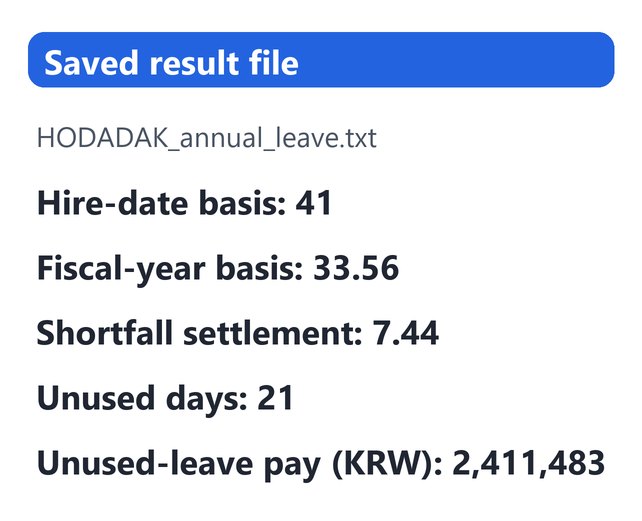
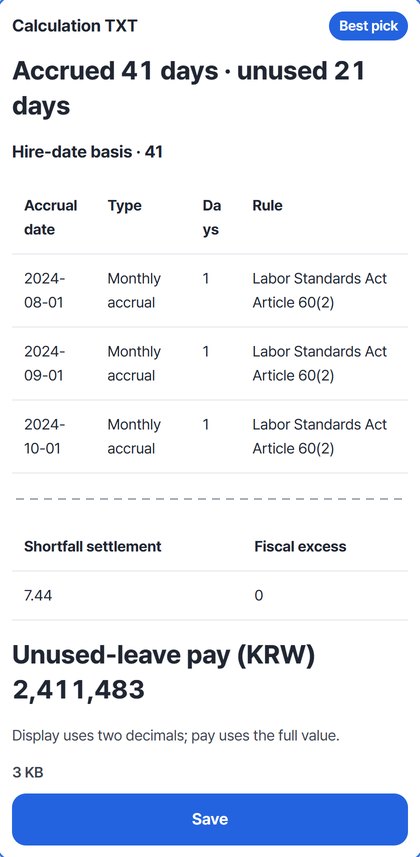
Leaving a fiscal-year company: 7.44-day shortfall · KRW 2,411,483 pay
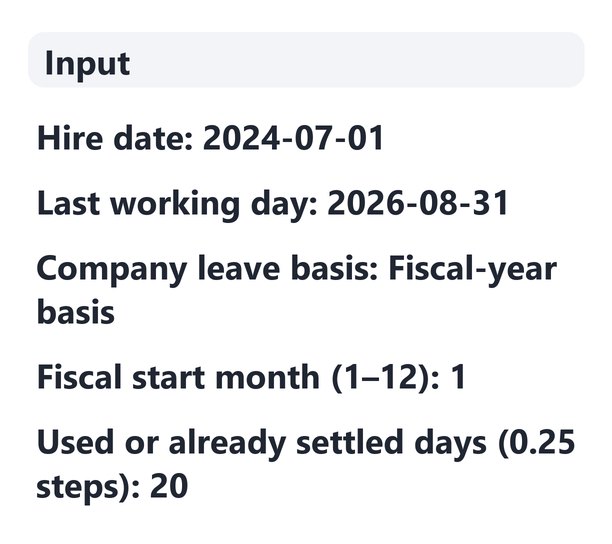
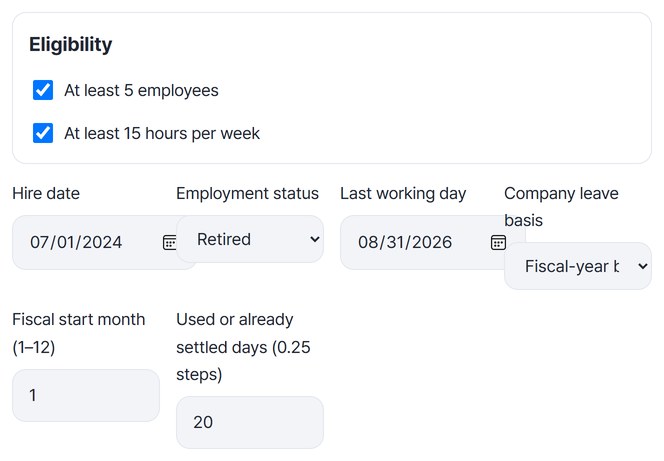
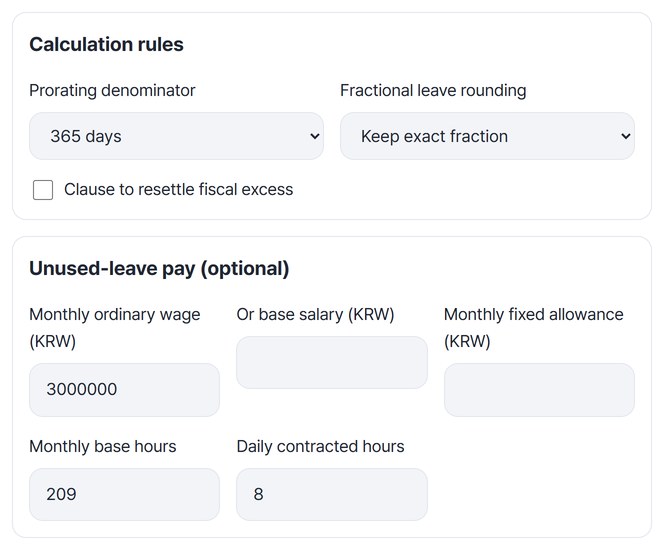
Hired on 2024-07-01, last working day 2026-08-31. The company uses a fiscal-year basis starting in January, 20 days were already used or settled, and the monthly ordinary wage is KRW 3,000,000. By hire date, 11 monthly days in the first year plus 15 days at one year and 15 more at two years make 41 days. The fiscal-year basis gives 33.56 days, including 7.56 prorated days in the first year, so 7.44 days are short and the settlement uses 41 days. Pay for the 21 unused days is 3,000,000 ÷ 209 × 8 × 21 = KRW 2,411,483.
Actual result of entering example dates and a wage chosen by HODADAK (not a real person’s data) into Annual leave calculator v0.1.2, then reopening the saved TXT and CSV to check them against a hand calculation. A reference figure; attendance rates, expiry and the scope of ordinary wages are not judged.
HOW TO
Three steps
Enter the dates and company basis
Confirm “At least 5 employees” and “At least 15 hours per week,” then enter the hire date. Changing “Employment status” to “Retired” shows the “Last working day” field. Choose “Fiscal-year basis” under “Company leave basis,” then enter the start month and the days used or already settled.
Enter the wage for leave pay
To see pay for unused leave, enter the monthly ordinary wage under “Unused-leave pay (optional).” Monthly base hours 209 and daily contracted hours 8 are filled in by default. The prorating denominator and rounding for first-year leave are under “Calculation rules.”
Check the comparison and save
Press “Calculate leave” to see the hire-date and fiscal-year tables, the shortfall settlement and the unused-leave pay. Save the calculation TXT and table CSV; if you are leaving, “Continue: Severance calculator” passes the hire date and last working day on.
WHEN
Perfect for
- Counting leave before you quit
See each accrual date and the days left, with the legal basis.
- Your company grants leave every January 1
Compare with the hire-date basis and find any shortfall.
- Calculating severance too
Pass the hire date and last working day on without retyping.
GOOD TO KNOW
Good to know
- Reference calculation only. It follows Articles 60–61 of the Labor Standards Act and Ministry of Employment and Labor interpretations (checked 2026-10-12). Attendance rates, expiry and the scope of ordinary wages are not judged, and company rules may differ.
- One person at a time; days used go in 0.25-day steps. Include days that already expired or were paid out.
- Retirement is the day after the last working day. If new leave would accrue on that day, the result points it out.
- First-year prorated fiscal leave is 15 × days employed ÷ 365, kept with decimals. The denominator (actual fiscal-year days) and rounding can be changed under “Calculation rules.” If the fiscal-year basis gives more days, they are kept unless there is a resettlement clause.
- With fewer than 5 employees or under 15 hours a week, it says statutory annual leave doesn’t apply and calculates no days.
FAQ
Frequently asked questions
Where do my dates and wage go?
Nowhere. The calculation runs inside this device’s browser, and passing dates to the severance calculator also happens inside the browser. Only the company leave basis, start month and calculation rules are remembered on this device.
I missed full attendance in some months of my first year.
Under “Missed perfect-attendance months in year one,” pick which month after hiring it was, and that month’s leave day is left out. Don’t exclude periods that count as attendance, such as maternity or parental leave.
Which devices has it been checked on?
We confirmed it in Edge and WebKit (the engine behind Safari) on Windows. Phones were tested by simulating a phone screen on a PC; checks on real Mac, iPhone and Android devices are still to come.
NEXT