
STOPWATCH
Pauses left out,
every lap on record.
Time with start, pause and lap buttons. Paused time is excluded, and splits and totals are kept separately and saved as CSV.
- No install
- No sign-up
- Files stay on this device
In short Stopwatch is a free web tool that records lap and cumulative times separately, excluding paused time, and saves them as CSV while paused. It runs in your browser with no install or sign-up, and what you type stays on your device — nothing is sent to a server. Up to 1,000 laps; reloading or closing the page clears the record. Timing through device sleep or screen lock and competition-grade precision aren’t guaranteed.
BEFORE → AFTER
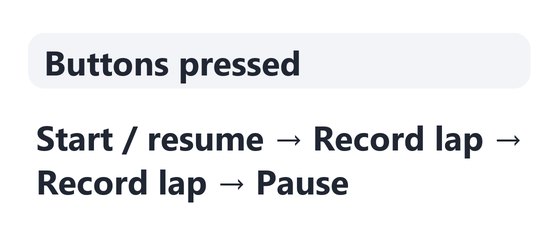
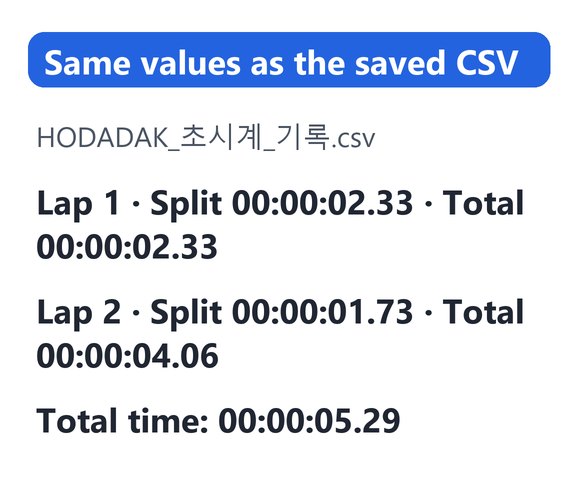
Two laps, then pause: total 00:00:05.29
Pressed Start → Record lap → Record lap → Pause. Lap 1 was 00:00:02.33, lap 2 00:00:01.73 (total 00:00:04.06), and with the time after the last lap the total is 00:00:05.29. The saved CSV holds the same values, plus seconds such as 2.330.
Actual result of timing with Stopwatch v0.1.0 and reopening the saved CSV to check it. This was a real timing, so the hundredths will differ if you run it again.
HOW TO
Three steps and done
Start and record laps
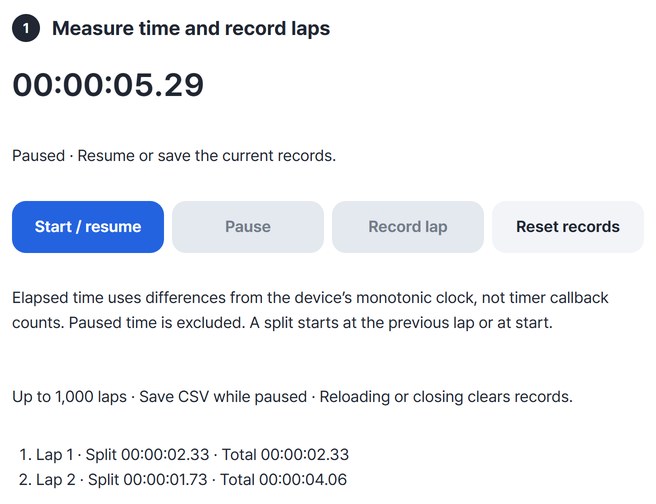
Press “Start / resume” to begin and “Record lap” at each split. Press “Pause” for breaks; that time is left out.
Pause, then review the record
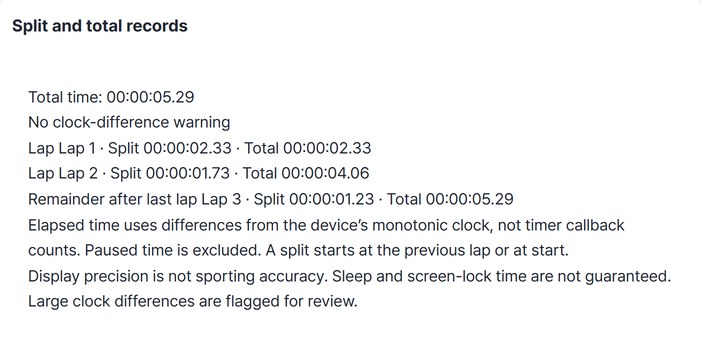
While paused, press “Review paused records” to see split and total times in a table.
Save as CSV
Press “Save” to get a CSV with split seconds, total seconds, times and the timing rules.

WHEN
Perfect for
- Practising a talk or interview
See how long each part takes.
- Timing work
Pause for breaks so they don’t count.
- Keeping a record
Open the CSV in a spreadsheet.
GOOD TO KNOW
Good to know
- How time is measured: from differences in the device’s monotonic clock, not by counting timer ticks. Paused time is excluded. Each split runs from the start or the previous lap.
- Save while paused: CSV is saved from a paused record. Up to 1,000 laps.
- Reloading or closing the page clears the record. Save what you need first.
- Not sports-grade timing. Time during sleep or screen lock is not guaranteed, and large differences from the device clock are flagged for review.
- This tool has no Continue step. Resume to keep recording, or save the CSV.
FAQ
Frequently asked questions
Where is the record kept?
Only on this page. Nothing is sent anywhere, and reloading or closing the window clears it, so save the CSV if you need it.
Does it count time while the screen is off?
Not guaranteed. Time while the device sleeps or the screen is locked may be inaccurate. Large differences from the device clock are flagged for review.
Which devices has it been checked on?
We confirmed it in Edge on Windows. Phones were tested by simulating a phone screen on a PC; Safari-based browsers and real Mac, iPhone and Android devices are still to come.
NEXT
Handy next steps
 New
NewAdjust the whole recording without adding clipped peaks. Listen before and after, then save a new WAV.
Open
Start, lap, pause, CSV.
No install, no sign-up. Right now.