EDIT PDF TEXT
Edit PDF text fix dates, amounts and typos
Wrong amount or date on a quote? Fix it right in the PDF.
Click text that is already in the PDF and fix it within one line. Instead of covering it with a white box, the old text is removed from the file and the new text is written in, so copying or searching the saved PDF won’t bring the old text back.
In short Edit PDF text is a web tool that lets you click text already in a PDF, change it within one line, and save a new PDF with the old text removed. One PDF up to 50MB and 200 pages, up to 100 changes at a time. Password-protected or digitally signed PDFs and pages without real text, such as scans, are not edited.
BEFORE → AFTER
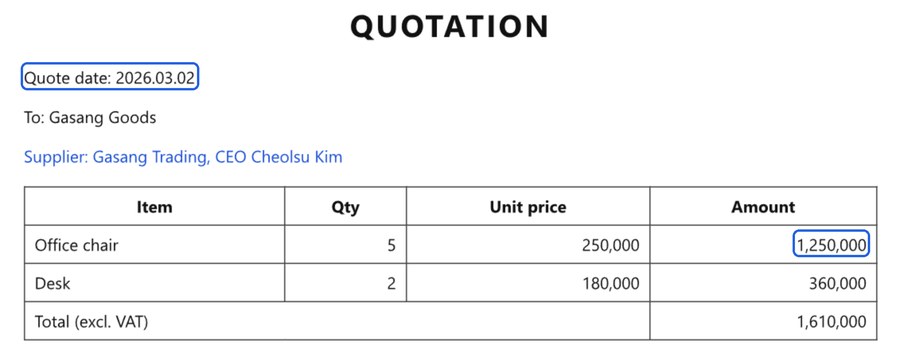
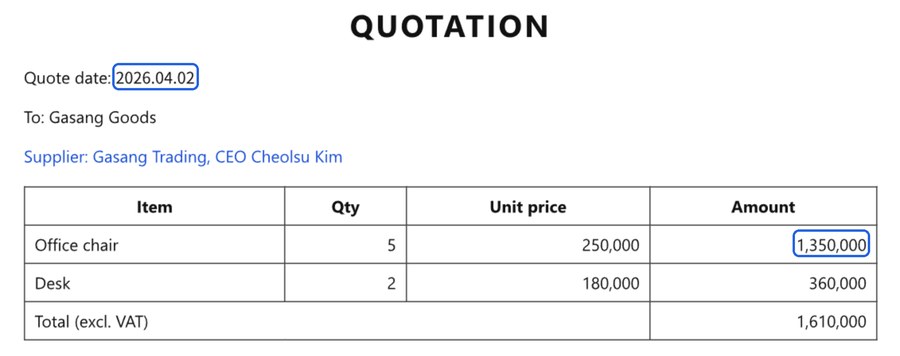
A quote with two fixes: the amount and the quote date
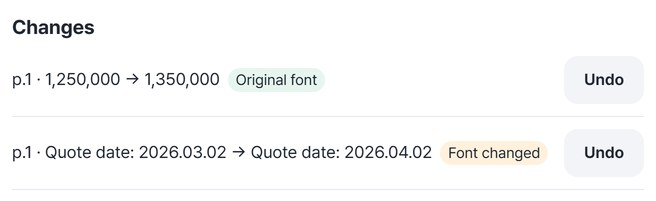
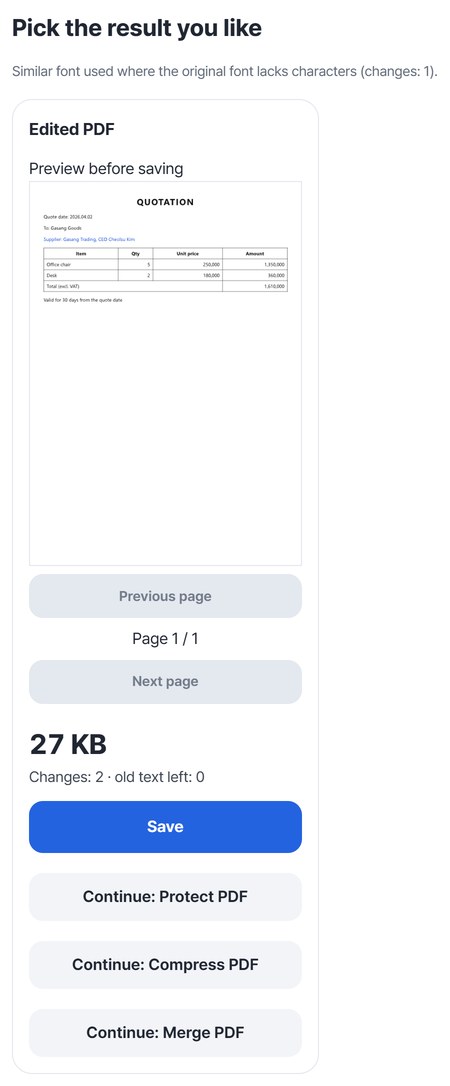
In a sample quote (quotation.pdf, 25,512 bytes) we changed the amount 1,250,000 to 1,350,000 and the quote date 2026.03.02 to 2026.04.02. The amount went in with the original font. The date went in with a similar font and a “Font changed” label, because the font inside the original file has no digit 4. Reopening the saved HODADAK_quotation_edited.pdf (27,631 bytes) and pulling out its text showed the old text zero times and each new value once.
Actual result of editing a sample quote with a made-up company name in Edit PDF text v0.1.1. The right image is the first page of the saved PDF, drawn again. The blue outlines are added only in this guide to show what changed; they are not in the saved PDF.
HOW TO
Three steps and done
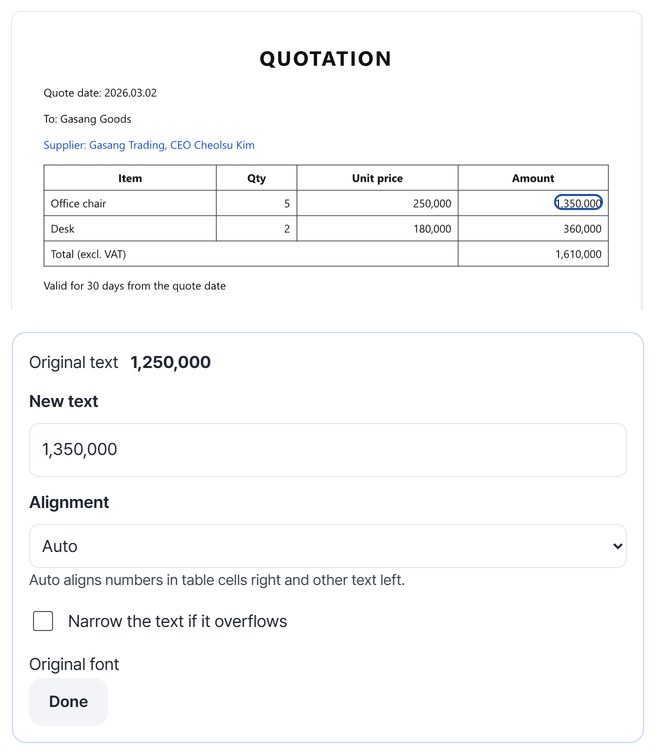
Open the PDF and click the text to fix
Choose a PDF and its first page appears. Click the text you want to fix and type the change in “New text” — the page image updates right away. Drag across text to choose only part of it.
Check the changes in the list
Each fix is added to the “Changes” list with an “Original font” or “Font changed” label. Use “Undo” on any change you don’t want.
Create the edited PDF and save it
Press “Create edited PDF.” The new file is reopened and checked for leftover old text before the result card appears. Look for “Changes: 2 · old text left: 0,” then press “Save.”
WHEN
Perfect for
- The amount or date on a quote you sent has changed
Fix just the numbers in the PDF, even without the original document file.
- You spot a typo in a notice or handout
Fix the text within the line and save a new PDF.
- Reusing a form with a new date or number
Change only the numbers in last time’s document.
GOOD TO KNOW
Good to know
- Use only on documents you are allowed to change. Forging certificates or contracts is a crime.
- Only text within one line is edited. It doesn’t reflow paragraphs or fix text in scans or images. Unlock a password-protected PDF with “Unlock PDF” first; a PDF with a digital signature isn’t edited, because editing would break the signature.
- Totals don’t update on their own. In the example above only the amount was changed, so the total 1,610,000 stayed the same. Click and fix each number that should change too.
- If the new text has characters the original font lacks, a similar font is downloaded (sans about 22MB, serif about 4MB). This needs an internet connection.
- Opens one PDF of up to 50MB and 200 pages. Up to 100 changes at a time.
FAQ
Frequently asked questions
Where do my files get uploaded?
Nowhere. Everything is processed in this device's browser, so there is nothing on a server to delete. Results you haven't saved are cleared when you close the window.
How is this different from covering text with a white box?
A box only hides the text from view; the old text stays in the file and shows up when you copy or search. This tool removes the old text from the file and writes in the new text. For the sample quote, we reopened the saved PDF with two different PDF readers and the old text did not appear once.
Why does “Font changed” appear?
Many PDFs carry only the character shapes used in the document. If a character you type isn’t in the original font, a similar font is used and this label is shown. In the sample quote, only the date used a similar font, because the original font had no digit 4. Check the look in the preview.
Which devices has it been checked on?
We confirmed it in Edge and WebKit (the engine behind Safari) on Windows. Phones were tested by simulating a phone screen on a PC; checks on real Mac, iPhone and Android devices are still to come.
NEXT