
IMAGE WATERMARK
Found your photo in someone else’s post?
Put your name on it first.
Add text or a logo to your photos and check its position, size, angle and opacity on the actual result. Your photos never leave this device.
- No install
- No sign-up
- Files stay on this device


BEFORE → AFTER
A name, repeated across a work photo
Text “© HODADAK STUDIO,” width 46%, opacity 70%, angle −18°, blue, repeated 3×3. Nine marks landed on the photo, and it stayed 1920×1080.


Actual result of processing a HODADAK sample photo (an example work photo) with Image watermark v0.1.0.
HOW TO
Three steps and done
Add your photos
Up to 8 JPEG or PNG photos. The same settings apply to all of them.
Add text or a logo and style it
Text up to 80 characters, or a JPEG/PNG logo. Set width, opacity, angle, text color and 3×3 repeat, then drag on the preview to position it.

Check each photo and save
After “Add watermark,” preview the results and save. Several photos come as one ZIP.

WHEN
Perfect for
- Sharing a portfolio or your work
Post it with your name on it.
- Product photos for a shop or resale listing
Your shop name or logo in the same spot on every photo.
- Sending drafts or proofs
Repeat a word like “DRAFT” across the image.
GOOD TO KNOW
Good to know
- Photos you can add: still JPEG · PNG, up to 8. 20MB · 24MP each, 80MB · 60MP in total. Logos up to 5MB · 4MP.
- Results are saved as PNG with shooting info (EXIF) removed. They can end up larger than a JPG original.
- Rotated marks shrink to stay inside the photo, and repeated marks fit within each cell.
- A watermark doesn’t stop removal or register your rights. Your text and logo aren’t remembered.
- Press Try a sample to try it without your own file. The Continue button on a result card carries on in another tool without adding the file again.
FAQ
Frequently asked questions
Where do my files get uploaded?
Nowhere. Everything is processed inside this device's browser, and closing the window clears both the files and the results.
Will a watermark stop people from taking my photos?
It helps show viewers where a photo came from, but it can’t stop someone from removing it, and it doesn’t register your rights. Raising the opacity or turning on 3×3 repeat makes it easier to see.
Which devices has it been checked on?
We confirmed it in Edge and WebKit (the engine behind Safari) on Windows. Phones were tested by simulating a phone screen on a PC; checks on real Mac, iPhone and Android devices are still to come.
NEXT
Handy next steps
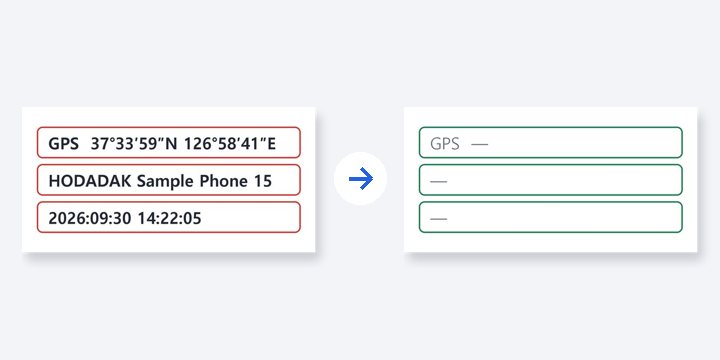 PhotoNewRemove photo metadata
Remove location and device info from photos, without recompressing them.
Open →How to use

Add it, drag it, save it with your name.
No install, no sign-up. Right now.