
GIF COMPRESSOR
Your GIF is “too large”?
Keep the motion, cut the size.
Shrink an animated GIF to fit the size you set. No frames are dropped and the speed stays the same — only colors and dimensions are adjusted.
- No install
- No sign-up
- Files stay on this device


BEFORE → AFTER
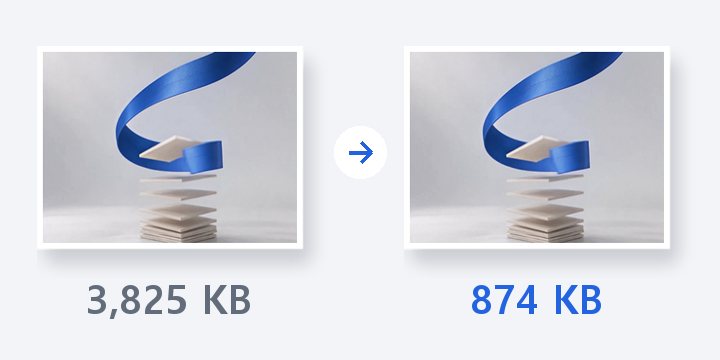
A 2,080 KB GIF brought under 1MB
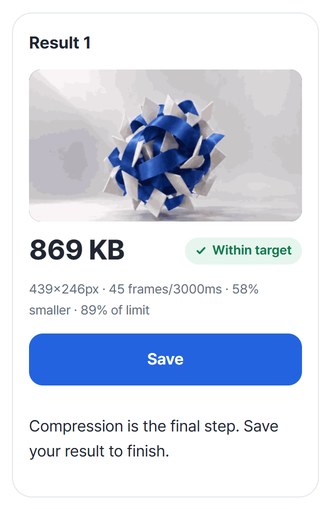
We added a 3-second GIF (45 frames) made by Video → GIF and set the target to 1,000KB. All 45 frames and the timing stayed; the picture went from 610×342 to 439×246 and the file to 869 KB.
Actual result of processing a GIF that Video → GIF made from the HODADAK home film, with GIF compressor v0.1.0. Images show the first frame of each GIF. Sizes are as shown on Windows.
HOW TO
Three steps and done
Add your GIFs
Up to 5 at once (20MB each, 50MB total). You can also continue straight from a Video → GIF result.
Set a target size
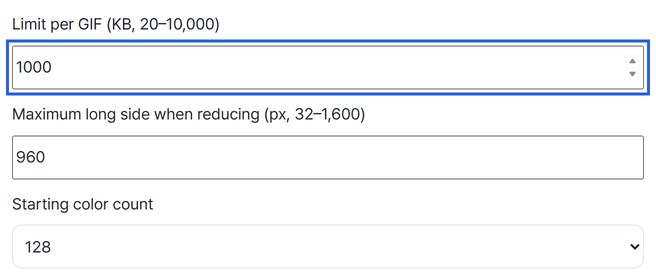
Enter a target per GIF in KB (20–10,000). You can also set the longest side and the starting number of colors.
Check the motion and save
Check motion, text and transparency in the result, then save. Several results can be saved as one ZIP.
WHEN
Perfect for
- Attachment limits in forums and chat
Fit within the KB you’re given.
- A Video → GIF result that’s a bit big
Continue straight here and shrink it more.
- Animated images for blogs and docs
Same frames, lighter page.
GOOD TO KNOW
Good to know
- No frames are dropped and the speed is unchanged. Frame order, recorded timing and loop count stay; colors and dimensions are lowered.
- GIFs you can add: 5 files, 20MB, 400 frames and 3 minutes each, 50MB in total.
- Transparency is kept, though edges and colors may shift a little. If it can’t get smaller, an original already within the target is kept; if it’s still over, you’re told it failed.
- Saving here finishes the job — there’s no next tool to continue to.
- Press Try a sample to try it without your own file.
FAQ
Frequently asked questions
Where do my files get uploaded?
Nowhere. Everything is processed inside this device's browser, and closing the window clears both the files and the results.
Will the GIF look choppy?
The number of frames and the timing stay the same, so it won’t speed up or skip. Colors and size are reduced instead, so check the preview before saving.
Which devices has it been checked on?
We confirmed it in Edge on Windows. Phones were tested by simulating a phone screen on a PC; Safari-based browsers and real Mac, iPhone and Android devices are still to come.
NEXT
Handy next steps
Add, set a target, lighten.
No install, no sign-up. Right now.