
VIDEO TO GIF
That one moment in the video,
saved as a GIF.
Pick the part you want and a target size, and get three GIFs for different needs at once. Your video never leaves this device.
- No install
- No sign-up
- Files stay on this device
 292 KB
BEFORE → AFTER
The first 3 seconds of an 8-second video as GIFs
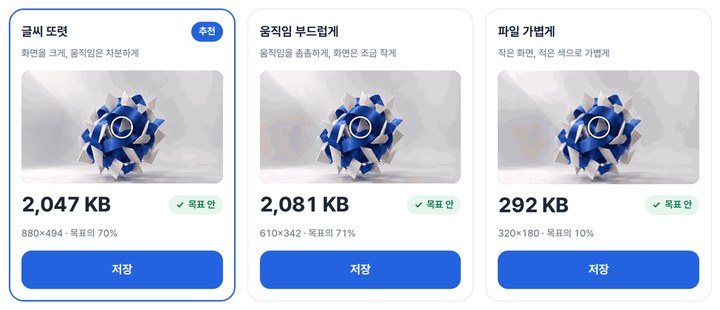
0.0–3.0 seconds, target 3MB. Sharp text, Smooth motion and Light file all came in under the target.





Actual result of processing the start of the HODADAK home video with Video → GIF v0.8.1, the version now live. The last image is the “Light file” GIF itself, so it moves. Sizes are as shown on Windows.
HOW TO
Three steps and done
Add your video
MP4, MOV or WebM, up to 50MB and 60 seconds.
Pick the part and a target size
Drag the handles or type start and end times (0.2–20 seconds). Targets: 1MB, 3MB, 8MB or custom.
Range0.0 – 3.0 sTarget size3MB
Compare the three and save
See “Sharp text,” “Smooth motion” and “Light file” side by side and save the one you like.
WHEN
Perfect for
- A moment of screen recording in team chat
A GIF plays right away, no video player needed.
- Blog or forum upload limits
Type in the target size.
- Short motion in how-to guides
Cut just the seconds you need.
GOOD TO KNOW
Good to know
- Videos you can add: MP4, MOV, WebM, up to 50MB and 60 seconds. If a phone original is over 50MB, save it again as MP4 first.
- You get three results — Sharp text (bigger picture, calmer motion), Smooth motion (denser motion, slightly smaller picture) and Light file (small picture, fewer colors). Nothing is made larger than the original.
- Larger targets take longer to make. GIFs have no sound.
FAQ
Frequently asked questions
Where do my files get uploaded?
Nowhere. Everything is processed inside this device's browser, and closing the window clears both the files and the results.
My video won’t open.
This browser may not be able to play it. Try another browser, or save it again as MP4.
Which devices has it been checked on?
We confirmed it in Edge on Windows. Phones were tested by simulating a phone screen on a PC; Safari-based browsers and real Mac, iPhone and Android devices are still to come.
NEXT
Handy next steps
Pick a part, pick a size, GIF.
No install, no sign-up. Right now.